


ORLANDO, FLORIDA — Every digital photographer is familiar with a particular kind of frustration: capturing a scene with technically flawless execution—correct exposure, tack-sharp focus, and a balanced composition—only to find that the final image somehow lacks a soul. It is sharp and accurate, yet visually flat.
According to industry professionals, the chasm separating a technically competent photograph from a mesmerizing, gallery-worthy piece rarely comes down to major structural overhauls. Instead, it is bridged by subtle, highly targeted finishing touches.
In the fast-evolving landscape of digital editing software, Skylum’s flagship platform, Luminar Neo, has carved out a distinct niche by addressing this exact creative dilemma. While the software is widely recognized for its aggressive AI-driven masking and replacement features, educators and developers emphasize that its true power lies in its nuanced, manual-control toolsets. Among these, the often-overlooked Color Harmony tool is rapidly emerging as the secret weapon for photographers seeking to inject life, atmosphere, and professional polish into otherwise stagnant imagery.
The Anatomy of a Finished Image: Main Facts
For decades, the post-processing workflow has centered around global sliders for exposure, contrast, and saturation. While effective for bringing raw data into a usable range, these broad strokes often lead to over-processed, unnatural results.

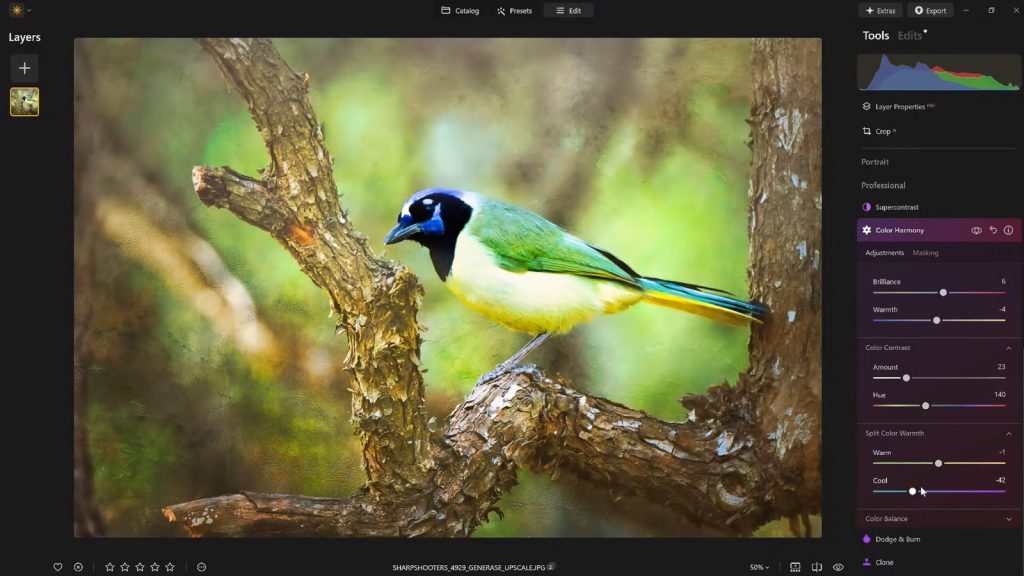
Luminar Neo’s Color Harmony tool, tucked quietly away within the software’s Professional Tools panel, departs from this blunt-force approach. Rather than applying uniform saturation, it introduces a sophisticated framework for managing how distinct color wavelengths interact across an entire frame.
- Core Functionality: Color Harmony controls are broken down into specific operational brackets: Brilliance, Warmth, Color Contrast, Split Warmth, and Color Balance.
- Target Audience: The feature is primarily designed for landscape, portrait, and travel photographers striving for cohesive color grading without resorting to complex, time-consuming masking layers.
- Accessibility: Located within the Professional tab of the Luminar Neo interface, it requires intentional navigation, which has led many casual users to bypass it in favor of automated presets.
“Color Harmony isn’t about making radical, reality-bending transformations,” explains Vanelli, Director of Education at Skylum and an accomplished Florida-based photographer and educator. “It is about introducing nuanced control. It allows the creator to guide the viewer’s eye, emphasize the primary subject, and construct a cohesive emotional atmosphere that matches the true lighting conditions of the scene.”
Evolution of a Workflow: A Chronological Look at Modern Editing
To understand the significance of tools like Color Harmony, it helps to examine how the post-processing paradigm has shifted over the last fifteen years.
Phase One: The Era of Global Adjustments (Early 2010s)
In the early days of digital RAW processing, photographers relied heavily on global histograms. Adjusting the saturation slider boosted every color channel equally, frequently clipping vibrant hues like reds and yellows while leaving muted tones lifeless. Achieving color separation required tedious, manual brushwork and localized adjustment layers.

Phase Two: The Rise of AI-Assisted Masking (Late 2010s to 2020s)
As computational photography matured, software developers introduced artificial intelligence capable of recognizing skies, human subjects, and foliage. While this saved countless hours in masking, it occasionally resulted in a homogenized "AI look"—images that were technically striking but felt emotionally detached from reality.
Phase Three: The Refinement Era (Present Day)
With platforms like Luminar Neo, the industry is shifting back toward artistic intent, backed by intelligent foundational tools. Color Harmony represents this current phase: it uses advanced algorithms to isolate tonal relationships (such as shadows, midtones, and highlights) while leaving the final aesthetic decisions entirely in the hands of the photographer. By breaking color down into microscopic components, modern software enables a level of artistic control that was once restricted to high-end cinematic color-grading suites like DaVinci Resolve.
Deconstructing the Toolkit: Supporting Data & Feature Breakdown
Mastering Luminar Neo’s finishing suite requires a clear understanding of what each individual slider accomplishes within a workflow. Professional educators break down the primary components of Color Harmony and its companion features as follows:
1. Brilliance and Warmth: The Gentle Touch
Standard saturation tools amplify all colors indiscriminately. Brilliance, however, evaluates the luminosity of individual pixels, selectively boosting richer tones while protecting already-saturated areas from clipping.

- Best Practice: A minute boost to brilliance enriches a scene while maintaining organic detail. Excessive application, however, can quickly steer an image into the realm of artificial hyper-realism.
- Warmth: Shifting the warmth slider right introduces a golden, sun-kissed atmosphere; shifting it left instills an ethereal, cool tone. The objective is emotional alignment—matching the color temperature to the psychological weight of the moment captured.
2. Color Contrast and Split Warmth
Color Contrast amplifies the visual tension between opposing color families (most notably complementary pairs like blues and oranges). When applied judiciously, it creates three-dimensional depth, making subjects pop from their backgrounds without requiring heavy local dodging and burning.
Meanwhile, Split Warmth provides granular control over dual-temperature lighting scenarios, allowing photographers to balance conflicting light sources—such as cool window light mixing with warm interior incandescent bulbs—within a single frame.
3. Color Balance for Shadows, Midtones, and Highlights
Perhaps the most advanced feature within the suite, Color Balance gives editors independent control over the color casts in the darkest shadows, the middle luminance values, and the brightest highlights. Shifting midtones slightly toward warmer or cooler hues can instantly transform the mood of a portrait or a sweeping landscape, establishing a signature cinematic grade that remains uniform across a multi-image portfolio.
4. Guiding the Eye with Vignettes and Inner Light
Once the color palette is locked in, leading the viewer’s gaze to the focal point becomes the priority. Luminar Neo approaches this via its integrated vignetting tool, which combines edge darkening with an adjustable Inner Light feature. By subtly illuminating the center of the frame while casting a soft shadow over the periphery, photographers create a natural spotlight effect. This eliminates the need for complex, hand-drawn radial filters, preserving a clean and organic look.
Industry Perspectives and Official Insights
The introduction of granular finishing workflows has sparked considerable discussion among industry leaders regarding the philosophy of modern digital art.

In recent educational seminars hosted through Skylum’s digital channels—including the widely popular Luminar Coffee Break series—experts have emphasized that editing is not about correcting mistakes, but rather about translation. A RAW file captures data; the editor translates that data into an emotional experience.
“After a long session of masking, retouching, and global adjustments, it is entirely normal to suffer from eye fatigue,” notes Vanelli. “Photographers often push sliders too far without realizing it, resulting in over-processed images that lose their organic charm.”
To combat this, professional workflows increasingly incorporate a strategic "safety valve": saving customized adjustments as reusable presets.
According to Skylum’s development data, applying a successful color-grading preset at a reduced opacity—typically between 70% and 80%—allows photographers to step away from a project, return with fresh eyes, and dial back aggressive edits. This methodology preserves the core aesthetic harmony of a series while preventing the digital artifacts often associated with over-editing.

Implications for the Future of Photography
As computational tools continue to democratize high-end post-processing, the implications for professional and amateur photographers alike are profound.
1. Shortened Post-Production Pipelines
By consolidating complex color-grading tasks into intuitive, slider-based interfaces, software like Luminar Neo drastically reduces editing times. Photographers can achieve commercial-grade results in minutes rather than hours, freeing up more time behind the physical camera lens.
2. Stylistic Consistency Across Portfolios
For commercial and wedding photographers, maintaining a recognizable visual identity across thousands of images is paramount. Tools that permit exact adjustments to shadow, midtone, and highlight balance ensure that an entire portfolio shares a unified, cinematic aesthetic—a capability once reserved for veteran colorists.
3. The Re-Valuation of Nuance
As automated AI filters become ubiquitous, the market is beginning to place a higher premium on restraint. Images that stand out in crowded digital spaces are increasingly those characterized by subtle, sophisticated color interplay rather than loud, over-saturated effects.
Conclusion
Ultimately, the defining characteristic of a compelling photograph is rarely a single, dramatic transformation. More often, it is the cumulative effect of a dozen carefully considered, micro-adjustments.
By mastering tools like Luminar Neo’s Color Harmony, photographers can bridge the gap between technical execution and artistic vision. Whether refining the warmth of a misty morning landscape or balancing the skin tones in a moody portrait, these finishing touches infuse digital files with the depth, emotion, and cohesion that separate a fleeting snapshot from a timeless work of art.
Special Offer for Readers: Photographers looking to incorporate these advanced finishing tools into their workflow can secure 10% off Luminar Neo by entering the promo code NATURETTL at checkout on the official Skylum platform.
