


Every photographer knows the quiet frustration of opening a batch of RAW files to find images that check every technical box—the exposure is spot-on, the focus is razor-sharp on the subject’s eye or the distant mountain ridge, and the composition follows the rule of thirds to absolute perfection. Yet, when laid out on the digital editing table, the photo falls utterly flat. It feels sterile, lifeless, and fundamentally unfinished.
According to industry veterans, the chasm separating a technically competent snapshot from a breathtaking, gallery-worthy photograph rarely lies in sweeping structural overhauls. Instead, it is bridged by subtle, highly intentional finishing touches.
In the modern digital darkroom, software suites have evolved past basic cropping and exposure sliders to offer nuanced aesthetic engines. Among these, Luminar Neo—developed by Skylum—features a suite specifically engineered to resurrect flat imagery: Color Harmony. Tucked quietly away under the Professional Tools menu, this powerhouse utility has historically been overlooked by beginners. However, for those who master its intricacies, it quickly becomes an indispensable mechanism for refining tone, contrast, and color balance.
The Anatomy of a Dull Photo: Why Technical Perfection Isn’t Enough
To understand why Color Harmony is so transformative, one must first examine the limitations of modern digital sensors. Cameras capture light mechanically, translating photons into digital data with scientific precision. However, this scientific precision lacks human emotion. A raw file records the world as it scientifically is, not as the photographer felt it at the moment of release.

When an image lacks emotional resonance, photographers frequently make the mistake of over-compensating. They reach for global saturation sliders, pushing hues until foliage looks neon and skin tones take on an unnatural orange tint. This heavy-handed approach destroys tonal gradation and results in harsh, fatiguing imagery.
The philosophy behind tools like Color Harmony is diametrically opposed to brute-force saturation. It operates on the principle of chromatic relationships—how colors converse with one another across a frame. By manipulating these relationships without blowing out tonal values, photographers can direct the human eye, anchor a subject, and evoke a specific atmospheric mood.
Deconstructing Color Harmony: A Modular Approach to Tonal Control
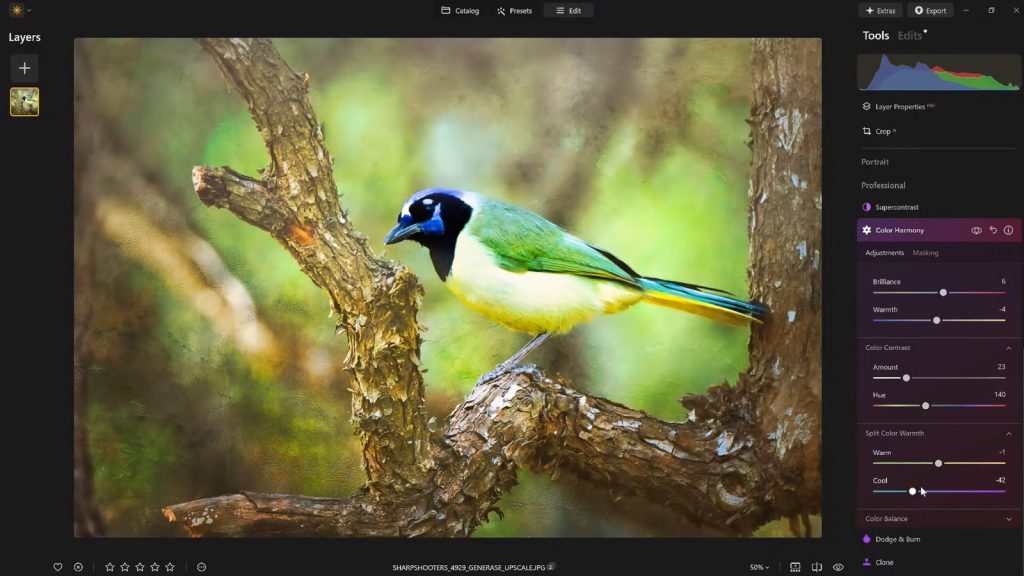
Nestled within Luminar Neo’s professional workspace, Color Harmony is broken down into several sub-panels, each designed to tackle a different dimension of color theory.
1. Brilliance and Warmth: The Gentle Touch
The journey to reviving a flat photograph often begins with Brilliance. Unlike standard saturation tools that affect every pixel equally—often clipping vibrant areas while ignoring muted ones—Brilliance introduces an intelligent vibrance adjustment.

- The Mechanism: When boosted slightly, Brilliance enriches mid-tone colors and brings out hidden depth while preserving natural textures and luminance details.
- The Pitfall: Over-application pushes an image past the boundary of realism into synthetic, hyper-processed territory. A feather-light touch is invariably rewarded.
Directly adjacent to Brilliance is the Warmth slider. Moving this control right infuses the frame with a golden, sun-kissed atmosphere, while shifting it left cools the scene down with crisp, glacial tones. The secret to professional execution here is psychological alignment: the warmth must mirror the emotional intent of the scene. A moody, overcast forest demands cool restraint, whereas a golden-hour portrait thrives on subtle, enveloping warmth.
2. Color Contrast: Building Visual Tension
Depth in a two-dimensional photograph is largely an illusion created by contrast. While tonal contrast (lights versus darks) is standard practice, Color Contrast introduces visual tension specifically between opposing color ranges—most notably the interplay between warm highlights and cool shadows.
When applied thoughtfully, Color Contrast separates elements within a layered composition. For instance, in a landscape featuring a warm autumn foreground and a cool blue mountainous background, enhancing color contrast pushes those two elements apart visually, giving the image a three-dimensional pop that traditional contrast tools simply cannot replicate.
3. Split Warmth: Precision in Complex Lighting
For advanced color grading, Split Warmth offers granular control over warm and cool tones. It acts as an invaluable asset when dealing with mixed-lighting environments—such as a subject standing under the cool shade of a building while illuminated by warm ambient sunlight.

While not every image requires the intervention of Split Warmth, complex architectural shots, street photography, and multi-layered nature scenes benefit immensely from its capacity to isolate and harmonize conflicting light sources.
4. Color Balance: The Pro’s Choice for Cohesion
Perhaps the most powerful, yet daunting, feature within the suite is Color Balance. By dividing adjustments independently across shadows, midtones, and highlights, it grants editors surgical control over the palette.
Shifting the midtones slightly toward a specific hue can transform the psychological impact of a series. A landscape can be coaxed into a welcoming, nostalgic warmth, while a portrait can be neutralized to ensure accurate, flattering skin tones. Mastering Color Balance is what separates amateur edits from professional portfolios, enabling a cohesive color-grading style across an entire collection of images.
Guiding the Eye: The Role of the Vignette
Once the chromatic foundation of an image is secured, the next challenge is composition reinforcement. Even with perfect colors, a viewer’s eye can wander out of the frame if the edges are too bright or distracting.

This is where modern digital vignetting comes into play. Far removed from the cheesy, artificial black borders of early digital editing, contemporary tools like those in Luminar Neo allow for a nuanced two-front approach: darkening the periphery while introducing an Inner Light to the center of the frame.
This creates a subtle, organic spotlight effect. The viewer’s gaze is gently ushered inward toward the primary subject without ever realizing they are being manipulated by software. It is a quiet, powerful storytelling device that enhances focus without requiring tedious local masking or brushing.
Workflow Efficiency: The Power of Presets and Non-Destructive Editing
One of the greatest hurdles in digital editing is eye fatigue. After staring at a high-contrast monitor for forty minutes, a photographer’s perception of color and brightness warps. What looked like a masterpiece at 2:00 AM often looks aggressively over-edited by 9:00 AM.
To combat this, professional workflows emphasize two key practices:

- Saving Custom Presets: Once a look is successfully dialed in, saving it as a user preset ensures stylistic consistency across a portfolio and establishes a repeatable baseline for future sessions.
- The 70-80% Rule: By applying a saved preset back to an image—often dialed down to 70% or 80% of its maximum opacity—editors can retain the core aesthetic of their creative vision while stripping away the excesses of fatigue-induced over-processing.
Industry Impact and Expert Endorsement
The shift toward intuitive, AI-assisted yet user-controlled finishing tools has fundamentally altered how professionals manage high-volume workloads. Skylum, the creative force behind Luminar Neo, has positioned its software not as a replacement for human artistic vision, but as an accelerator that removes friction from the post-production pipeline.
Vanelli, Skylum’s Director of Education and a celebrated figure in the photography community, frequently emphasizes that tools like Color Harmony are designed to restore what is lost in translation between the human eye and the digital sensor.
"What sets apart a truly compelling image often isn’t a dramatic, wholesale change," Vanelli notes in his curriculum. "It is a handful of carefully considered enhancements. Color Harmony, combined with subtle vignetting and a thoughtful editing approach, adds depth, emotion, and cohesion."
From his roots as a Triple Crown Karate champion to his current status as a leading visual arts educator and host of the popular Luminar Coffee Break series, Vanelli has dedicated his career to demystifying advanced post-processing for creators at all skill levels. His philosophy underpins the modern push toward streamlined, highly impactful finishing workflows.
Implications for the Future of Digital Imaging
As artificial intelligence and computational photography continue to evolve, purists occasionally voice concern that software is doing too much of the heavy lifting. However, features like Color Harmony prove that the sweet spot of modern editing lies in collaboration between human aesthetic intent and computational precision.
The software does not dictate what an image should look like; rather, it provides an organized, mathematically sound playground for the photographer to execute their unique vision. By handling the complex mathematics of color interaction, tools like Luminar Neo free up the creator to focus on what truly matters: storytelling, mood, and emotional resonance.
For photographers eager to elevate their portfolios without spending hours wrestling with complex masking layers and channel mixers, exploring the professional tools hidden inside modern editing suites offers an immediate path forward. And for those ready to integrate these techniques into their workflow, industry partners continue to offer accessible entry points—such as the exclusive 10% discount available using the code NATURETTL at checkout on Skylum’s platform.
Ultimately, the camera captures the raw ingredients of a scene, but it is in the digital darkroom—through subtle touches of color, contrast, and light—that a photograph finally wakes up.
