


Every photographer knows the quiet frustration of reviewing a set of raw captures that check all the technical boxes. The exposure histogram is balanced, the subject is tack-sharp, and the rule of thirds has been applied with precision. Yet, despite checking every mechanical requirement, the image feels fundamentally incomplete—flat, sterile, and devoid of the emotional resonance that separates a mere record of a scene from a compelling work of visual art.
Often, bridging the gap between a technically competent photograph and a breathtaking visual statement has little to do with high-end camera bodies or expensive glass. Instead, it comes down to the subtle, intentional application of finishing touches during post-processing. For many modern digital artists, unlocking this final layer of polish requires looking past standard global sliders and diving into nuanced color grading tools.
Among the software solutions addressing this creative hurdle, Skylum’s Luminar Neo has carved out a distinct reputation. Nestled within its advanced suite is a powerful yet frequently overlooked feature set: Color Harmony. When combined with thoughtful post-processing habits like targeted vignetting and preset management, this tool provides a masterclass in how subtle digital craftsmanship can resurrect a lifeless frame.
Main Facts: Unlocking the Power of Color Harmony in Luminar Neo
At its core, post-processing software is designed to emulate and expand upon the chemical darkroom techniques of the past. However, digital suites often overwhelm users with an excess of blunt instruments—heavy-handed saturation boosts, destructive contrast adjustments, and unnatural luminance shifts that degrade image quality.

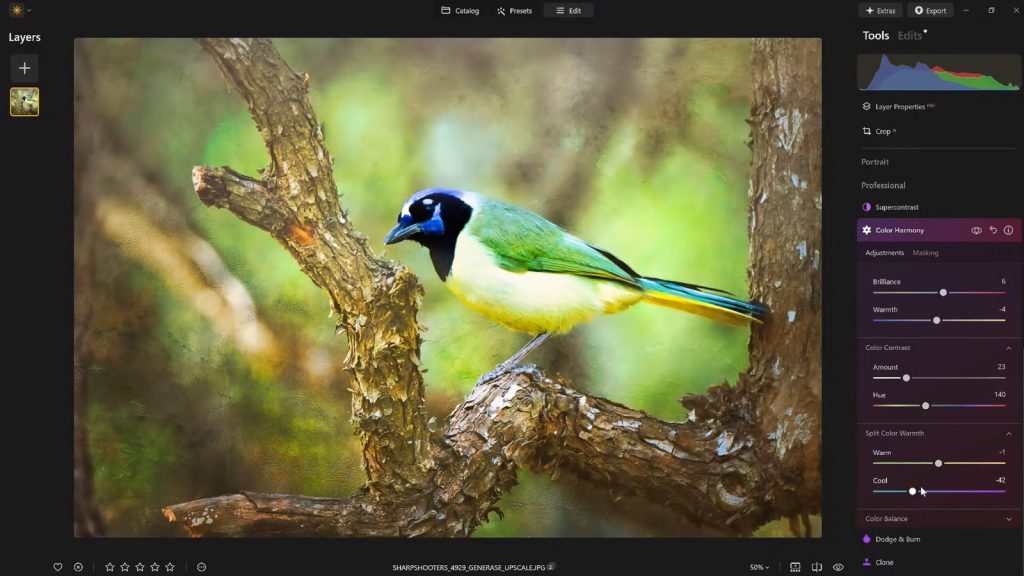
Luminar Neo attempts to bypass these pitfalls with its specialized Color Harmony tool, located within the platform’s Professional Tools panel. Rather than forcing a wholesale, jarring transformation of a photograph, Color Harmony is engineered to introduce microscopic, highly nuanced control over how different hues interact across an entire composition.
Key adjustment modules within the tool include:
- Brilliance: A sophisticated alternative to standard saturation that enriches color tones while protecting natural textures and highlights.
- Warmth: A precise temperature controller designed to infuse a scene with golden-hour atmosphere or cool it down for a moody, atmospheric aesthetic.
- Color Contrast: A specialized slider that increases visual tension specifically between disparate color ranges, such as highlights and shadows, adding depth without aggressive sharpening.
- Split Warmth: An advanced feature enabling photographers to independently direct warm and cool tones, proving invaluable in complex lighting scenarios or multi-layered landscapes.
- Color Balance: A granular tool offering isolated command over shadow, midtone, and highlight color shifts, echoing traditional cinema color-grading workflows.
According to software developers and digital photography educators, these integrated sliders work in tandem to naturally guide the viewer’s eye, isolate the primary subject, and establish a cohesive mood tailored to the unique lighting conditions of the original capture.
Chronology: The Evolution of Digital Finishing and the Rise of AI-Assisted Editing
To understand the significance of tools like Luminar Neo’s Color Harmony, it is helpful to examine the historical trajectory of digital photography post-production over the last three decades.

Phase 1: The Raw Conversion Era (Late 1990s – Early 2000s)
When digital sensors first began replacing film in professional workflows, the immediate priority was simply retrieving usable data from proprietary RAW files. Editing software was primarily functional, focusing on basic exposure recovery, white balance correction, and rudimentary cropping. Color manipulation was largely destructive, often resulting in digital artifacts and unsightly banding.
Phase 2: The HDR and Global Enhancement Boom (2000s – 2010s)
As processing power increased, the industry witnessed a wave of heavy-handed editing trends. High Dynamic Range (HDR) software allowed photographers to merge exposures, but early iterations frequently led to an over-processed, "grungy" aesthetic characterized by glowing halos and hyper-saturated colors. Photographers relied heavily on global adjustments that altered every pixel in an image uniformly, lacking the localized finesse required for organic results.
Phase 3: The Era of Nuanced, Layered Control (Present)
Today, the paradigm has shifted decisively toward subtlety and artificial intelligence-assisted workflow optimization. Modern platforms like Luminar Neo recognize that contemporary photographers do not want software to paint the picture for them; rather, they require intelligent tools that accelerate the tedious aspects of masking and local adjustments while offering deep, granular control over color science. The introduction of tools like Color Harmony represents the current peak of this philosophy—providing cinema-grade color grading capabilities within an accessible, non-destructive environment.
Supporting Data and Technical Analysis: Mastering the Sliders
To successfully implement these finishing techniques without falling into the trap of over-processing, photographers must understand the specific behavioral characteristics of each adjustment tool.

Brilliance and Warmth: The Gentle Touch
Standard saturation algorithms boost the intensity of all colors equally, frequently causing reds and oranges to clip and skin tones to turn unnaturally neon. Brilliance, by contrast, targets under-saturated pixels more aggressively while leaving already-rich tones protected.
- Best Practice: A modest positive adjustment to Brilliance injects life into dull foliage or overcast skies. However, pushing this slider past conservative thresholds introduces a synthetic, plastic look that immediately betrays amateur processing.
- Warmth Integration: Moving the Warmth slider right introduces a welcoming, sun-drenched atmospheric quality, while shifting it left evokes crisp, sterile morning light or chilling winter air. The golden rule is emotional alignment: the color temperature must reflect the psychological reality of the environment the photographer stood within.
Harnessing Color Contrast and Split Warmth
Visual depth in a two-dimensional photograph relies heavily on contrast—not just tonal contrast (light versus dark), but color contrast (complementary interactions, such as blues against oranges).
- Color Contrast amplifies the natural separation between opposing color families. When applied thoughtfully, it pulls elements forward from the background, creating a three-dimensional pop without requiring aggressive local dodging and burning.
- Split Warmth provides a surgical instrument for complex lighting. In scenes featuring mixed illumination—such as warm indoor incandescent lighting spilling into cool, shadow-drenched window light—Split Warmth allows the artist to harmonize disparate color temperatures gracefully.
Color Balance and the Cinema Standard
Borrowed directly from Hollywood color-grading suites, the Color Balance panel segments the image into shadows, midtones, and highlights.
- By subtly shifting midtones toward a warm amber or a cool cyan, photographers can dictate the entire emotional tenor of a photo set.
- This tool is particularly vital for commercial and fine-art photographers who must maintain a consistent "look" across an extensive portfolio or series of images.
Official Perspectives and Industry Insights
The philosophy underpinning these workflows has been championed heavily by industry leaders and visual arts educators. Among the most prominent voices in this space is Vanelli, an accomplished photographer, author, and the Director of Education at Skylum.

Transitioning from a background as a Triple Crown Karate champion to becoming a leading figure in visual arts education, Vanelli has spent years demystifying complex editing workflows for photographers worldwide. As the host of the popular Luminar Coffee Break series and a keynote speaker at major industry conferences, his pedagogical approach consistently emphasizes restraint over excess.
"What sets apart a truly compelling image often isn’t a dramatic change—it’s a handful of carefully considered enhancements," Vanelli notes. "Color Harmony, combined with subtle vignetting and a thoughtful editing approach, adds depth, emotion, and cohesion. For photographers looking to add polish without overprocessing, these finishing tools offer just the right balance of control and creativity."
According to Skylum’s development teams, the goal behind engineering tools like Color Harmony was to bridge the gap between technical accuracy and artistic expression, allowing creators to spend less time wrestling with complex layer masks and more time focusing on narrative impact.
Implications: Workflow Efficiency, Consistency, and Creative Preservation
The implementation of advanced color harmony and systematic finishing touches has profound implications for modern photography workflows, particularly regarding efficiency and artistic consistency.

1. Eliminating Decision Fatigue and Streamlining Series
For wedding, landscape, and commercial photographers, processing hundreds—if not thousands—of images poses a monumental organizational and creative challenge. By mastering tools like Color Harmony and subsequently saving those configurations as custom presets, creators establish a reliable baseline for entire portfolios.
Furthermore, saving a look acts as a vital creative safety net. Editors frequently experience "eye fatigue" during long editing sessions, leading them to push sliders too far into hyper-saturation or aggressive contrast. By stepping away from a project and later reapplying a saved preset at a reduced opacity (such as 70% to 80%), photographers can retain their core aesthetic vision while neutralizing over-editing errors.
2. Directing the Gaze Through Vignetting and Inner Light
Post-processing extends beyond color selection into the realm of visual psychology. Once color balance has been achieved, introducing a subtle vignette—paired with a touch of "Inner Light" in the center—acts as an invisible guide for the human eye.
Human psychology dictates that viewers naturally gravitate toward the brightest area of a frame surrounded by darker tones. By darkening the peripheral edges of an image digitally, photographers recreate the natural falloff of vintage lenses and focus the audience’s attention squarely on the intended subject, all without resorting to heavy-handed local masking.
3. Economic and Educational Accessibility
As software suites like Luminar Neo continue to integrate sophisticated, AI-assisted yet user-controllable features, the barrier to entry for professional-grade color grading lowers significantly. Hobbyists and semi-professionals no longer need years of specialized training in complex node-based compositing software to achieve museum-quality color separation.
Conclusion
Photography remains an art form defined by choices. While capturing the decisive moment in the field requires patience, vision, and technical proficiency, the digital darkroom offers a second chance to articulate the emotional truth of a scene.
By looking beyond basic global adjustments and embracing the nuanced capabilities of tools like Luminar Neo’s Color Harmony, photographers can elevate their work from technically sound to visually unforgettable. Through measured applications of brilliance, split warmth, balanced tones, and intentional vignetting, the final image ceases to be just a flat digital file—it transforms into an evocative visual narrative.
Special Offer: Photographers looking to experiment with these advanced finishing techniques can acquire Luminar Neo with an exclusive 10% discount by applying the promo code NATURETTL at checkout on the official Skylum platform.
