


TAMPA, FLORIDA — In the modern digital darkroom, every photographer is eventually confronted with a familiar frustration: the technical capture is flawless. The histogram is balanced, the focus is razor-sharp on the subject’s eyes or the wind-swept textures of a distant ridgeline, and the framing adheres strictly to the rule of thirds. Yet, upon opening the file on a calibrated monitor, the image feels hollow. It is clinically correct, but emotionally inert.
According to industry professionals and digital artists, bridging the gap between a technically competent photograph and a truly arresting visual narrative rarely requires a complete overhaul of the composition. Instead, it relies on nuanced, deliberate finishing touches. For users of Skylum’s flagship editing suite, Luminar Neo, that missing link is frequently found tucked away within the software’s advanced architecture: the Color Harmony tool.
Often overshadowed by automated AI enhancements and sweeping sky replacements, this professional-tier feature offers granular control over tonal relationships. When paired with strategic vignetting and a disciplined workflow, Color Harmony can transform flat digital captures into vibrant, mood-driven works of art.

1. Main Facts: Unlocking the Professional Suite in Luminar Neo
At its core, digital photo editing has evolved from a simulation of chemical darkroom practices into a sophisticated synthesis of computer science and artistic intent. Skylum’s Luminar Neo has established itself as a major player in this space by balancing artificial intelligence with manual, artist-driven controls.
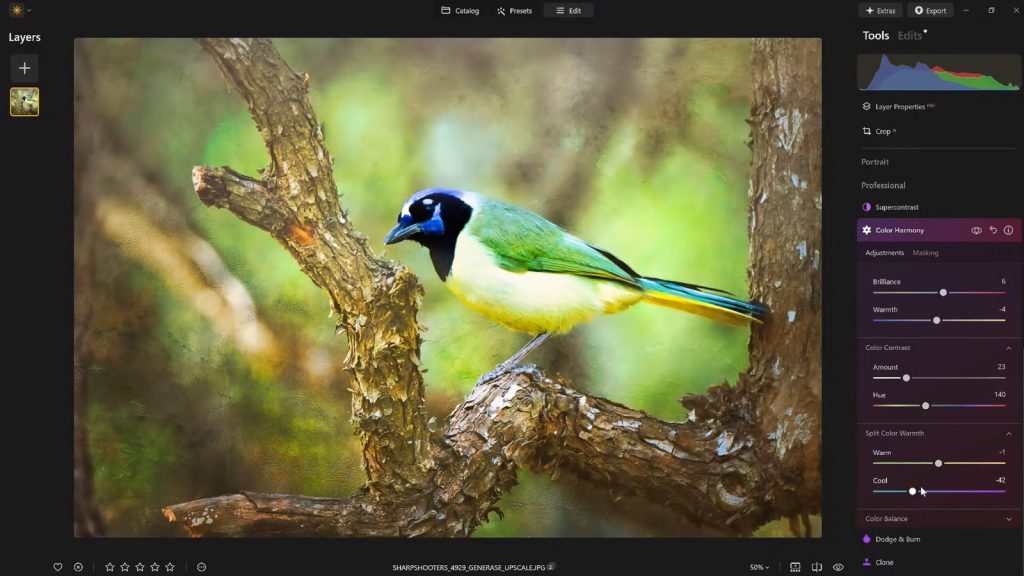
The Color Harmony tool resides deep within the software’s Professional Tools panel. While novice users frequently bypass it in favor of one-click presets, seasoned retouchers recognize it as the command center for emotional resonance. Rather than applying a blunt saturation boost—which often clips highlights and introduces unnatural neon casts—Color Harmony governs the microscopic interactions between hues across the entire frame.
Key Components of Color Harmony:
- Brilliance & Warmth: Calibrate vibrance and color temperature safely without destroying natural skin tones or foliage textures.
- Color Contrast: Introduce micro-tension between contrasting color ranges to increase perceived depth.
- Split Warmth: Isolate and manipulate warm and cool light sources independently.
- Color Balance: Target specific luminance zones (shadows, midtones, and highlights) to establish cohesive color grading.
2. Chronology: The Evolution of Color Grading in Consumer Software
The journey toward accessible yet sophisticated color manipulation has transformed dramatically over the past two decades.

- Early Digital Era (2000–2010): Photographers relied heavily on global sliders like Hue, Saturation, and Luminance (HSL). Adjustments were often crude, leading to oversaturated skies and unnatural color bleed.
- The Rise of Local Masking (2010–2020): Software developers introduced gradient filters and adjustment brushes, allowing targeted edits. However, these tools demanded extensive manual labor and deep technical knowledge of color theory.
- The AI and Modular Integration Era (2020–Present): Modern platforms like Luminar Neo began integrating contextual AI alongside precision color tools. Features like Color Harmony were designed to bridge the gap, offering high-end cinematic color grading—traditionally reserved for Hollywood colorists using DaVinci Resolve—to everyday photographers through intuitive sliders.
3. Supporting Data: The Psychology of Color and Viewer Retention
Market research and eye-tracking studies within digital media consistently demonstrate that color plays a primary role in human visual processing.
- Subconscious Direction: Studies in visual psychology indicate that the human eye is naturally drawn to areas of high color contrast and warm highlights within the first 200 milliseconds of viewing an image.
- Emotional Mapping: Cool color palettes (blues, cyans, deep greens) tend to evoke feelings of solitude, calm, or melancholy, whereas warm palettes (ambers, golds, soft oranges) stimulate feelings of comfort, nostalgia, and intimacy.
- The Over-Processing Trap: Industry surveys of photography consumers reveal that over 65% of viewers immediately disconnect from images that exhibit "haloing" or oversaturated color clipping, reinforcing the industry-wide shift toward subtle, organic grading techniques pioneered by tools like Brilliance and Color Balance.
4. Official Insights and Expert Breakdown
To understand how to maximize these tools, industry veterans emphasize a methodical approach to post-processing. Vanelli, an accomplished photographer, author, and the Director of Education at Skylum, advocates for a restrained touch when finalizing an image.
Navigating Brilliance and Warmth
"Starting with Brilliance, small adjustments can increase or decrease vibrance without the harsh effects of standard saturation," Vanelli explains. Boosting brilliance slightly enriches tones while maintaining the delicate organic details that heavy-handed sliders routinely destroy.

Similarly, the Warmth slider should be treated as an atmospheric dial rather than a white-balance fix. Shifting the slider right introduces a sun-drenched, golden-hour ambiance, while a left shift mimics overcast or twilight conditions. The golden rule is alignment: the color temperature must match the inherent lighting narrative captured in the field.
Harnessing Color Contrast and Split Warmth
Color Contrast elevates visual tension by emphasizing the natural opposition between complementary color families—such as blues and oranges. When applied with restraint, it provides a three-dimensional pop that separates the subject from the background.
Split Warmth takes this a step further by granting explicit authority over complex mixed-lighting scenarios. Whether shooting under the canopy of a forest with dappled sunlight or inside a venue with conflicting tungsten and LED lights, Split Warmth allows the editor to harmonize disparate light sources without introducing muddy color shifts.

The Precision of Color Balance
For advanced users, the Color Balance tool offers independent control over shadows, midtones, and highlights. Shifting midtones slightly toward warmer hues can instantly render a landscape more inviting or a portrait more natural.
"It’s a more advanced tool," notes Vanelli, "but it becomes indispensable for creating consistent color grading across a photo set once understood."
5. Implications for the Future of Photography Workflows
The democratization of professional-grade color grading tools carries significant implications for both amateur and professional photographers.

1. Speed vs. Artistry
As software automates the tedious aspects of culling and exposure correction, the value proposition of a photographer shifts entirely toward their creative vision and finishing style. Tools that streamline color grading without sacrificing creative control allow creators to deliver high-end, gallery-ready work in a fraction of the traditional processing time.
2. Workflow Consistency and Preset Discipline
A major takeaway from advanced Luminar Neo workflows is the strategic use of custom presets. Saving a successfully graded image as a custom preset does more than just speed up batch processing; it serves as a psychological safety net.
Photographers frequently suffer from "eye fatigue" during long editing sessions, often pushing contrast and saturation past reasonable limits. By applying a saved preset at a reduced opacity (such as 70% to 80%) during a fresh review session, creators can maintain a signature aesthetic while neutralizing over-editing tendencies.
3. Directing the Eye Without Heavy Masking
Finally, the integration of traditional finishing techniques—such as vignettes with an adjustable "Inner Light" center—demonstrates that less is often more. By darkening the borders organically, the software creates a natural spotlight that guides the viewer’s journey inward, rendering complex local masking unnecessary for standard storytelling needs.
Conclusion: Refining the Craft
Ultimately, what elevates a compelling photograph from good to unforgettable is rarely a radical, transformative gimmick. It is the culmination of disciplined composition, thoughtful exposure, and meticulous, restrained color finishing.
By mastering tools like Color Harmony, Split Warmth, and targeted vignetting within platforms like Luminar Neo, photographers can inject genuine emotion and cinematic cohesion into their portfolios. For those looking to integrate these professional finishing touches into their own workflows, Skylum offers 10% off Luminar Neo using the exclusive promo code NATURETTL at checkout.
