


ORLANDO, Fla. — Every photographer is familiar with a particular brand of frustration. You import a batch of RAW files from a recent shoot, review the contact sheet, and find a frame that ticks every technical box. The exposure is dead-on, the primary subject is critically sharp from corner to corner, and the composition follows the time-tested rules of visual geometry. Yet, when you open the file in your editing suite, the photograph feels fundamentally lifeless—technically correct, but visually flat.
In the upper echelons of professional commercial, landscape, and portrait photography, the chasm between a merely acceptable shot and a breathtaking portfolio piece rarely comes down to sweeping, dramatic overhauls. Instead, it is bridged by the delicate application of subtle finishing touches.
Industry veterans have long understood that post-processing is where a photograph’s true emotional resonance is forged. For years, achieving this level of nuanced refinement required complex, multi-layered masking, intricate split-toning algorithms, and exhaustive manual color grading. Today, however, software engineering is shifting the paradigm. Skylum’s flagship editing suite, Luminar Neo, has captured the attention of educators and working professionals alike by democratizing these advanced techniques. Tucked away within the platform’s Professional Tools menu lies a feature set that many casual users overlook: Color Harmony.
When paired with targeted vignetting and a disciplined workflow, Color Harmony has rapidly evolved from an obscure slider panel into an indispensable secret weapon for modern digital artists.

The Evolution of Digital Finishing: From Technical Correction to Artistic Vision
To understand the significance of tools like Color Harmony, one must first look at the broader trajectory of digital darkroom technology. Over the past two decades, editing software has evolved through distinct generational phases.
The Chronology of Modern Photo Editing
- Phase One: Digital Conversion (Late 1990s – Early 2000s): The dawn of digital photography focused heavily on emulation—translating RAW sensor data into a viewable digital negative that mimicked traditional film development. Tools were blunt, dealing primarily with basic exposure, white balance, and contrast.
- Phase Two: Global Manipulation (Mid 2000s – 2010s): The era of localized sliders and heavy-handed global adjustments. Photographers gained the power to radically shift hues, push saturation to its limits, and pull staggering amounts of dynamic range from shadows and highlights. Unfortunately, this era also gave birth to widespread overprocessing, often characterized by severe halos, clipped color channels, and artificial-looking "HDR" aesthetics.
- Phase Three: Intelligent Refinement (2020s – Present): Driven by artificial intelligence and machine learning, modern software development has pivoted toward contextual awareness and nuanced control. Rather than forcing a user to manually mask complex environmental elements, contemporary tools analyze the semantic content of an image. Platforms like Luminar Neo represent this current phase, offering AI-backed structuring alongside deep, highly targeted color and tonal control systems designed to emulate the subtle, organic behavior of traditional chemical printing.
According to industry data shared by major imaging software developers, user engagement has shifted dramatically over the last five years. While automated filters and one-click presets initially dominated adoption curves, professional and advanced amateur workflows have seen a massive resurgence in manual micro-adjustment tools. Photographers are increasingly seeking granular control over how light and color interact, signaling a collective fatigue with generic, cookie-cutter filters.
Unlocking Color Harmony: A Professional Deep Dive
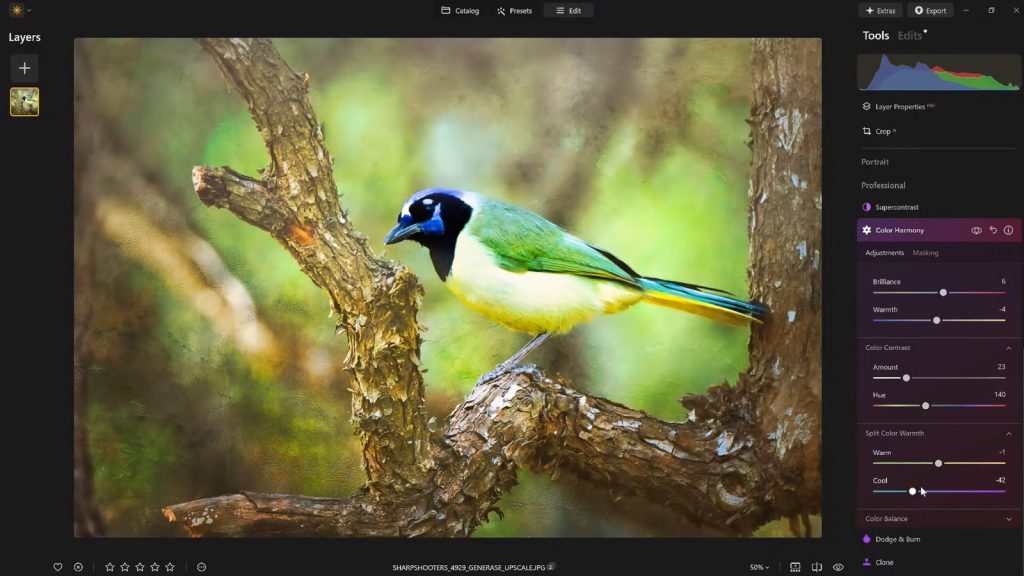
Nestled unobtrusively in the Professional Tools section of Luminar Neo, Color Harmony is frequently missed by newcomers who gravitate toward the more prominent AI-driven features. However, for those who take the time to integrate it into their pipelines, it fundamentally alters how color relationships are managed within a frame.
Unlike traditional saturation controls—which uniformly amplify every pixel falling into a specific color channel—Color Harmony approaches the image through the lens of artistic color theory. It introduces nuanced, interrelated controls over how different hues converse with one another across the tonal scale.

1. Brilliance and Warmth: The Gentle Touch
The tool begins with Brilliance, a slider designed to increase or decrease the vibrance of an image without triggering the harsh, clipping side-effects associated with standard saturation boosts.
- The Mechanism: When a photographer nudges Brilliance upward, the algorithm intelligently identifies muted mid-tones and enriches their tonal depth while actively protecting already-saturated highlights and skin tones from blowing out.
- The Professional Caveat: As Vanelli, Director of Education at Skylum, frequently emphasizes in his instructional workshops, restraint is paramount. "A light touch yields the best result," Vanelli notes. Over-leveraging Brilliance can quickly push an otherwise organic scene into an oversaturated, artificial territory that betrays the hand of the retoucher.
Directly adjacent to Brilliance lies Warmth. Moving this slider right introduces a rich, golden-hour atmosphere, while a leftward shift cools the ambient temperature down toward crisp blues and cyans. The golden rule among top-tier retouchers is emotional alignment: the color temperature must actively serve the narrative mood of the scene. A moody alpine landscape benefits from a calculated cooling pass, whereas an intimate street portrait often demands a subtle infusion of warmth to create a welcoming, tactile feel.
2. Crafting Tension with Color Contrast and Split Warmth
Moving deeper into the panel, Color Contrast addresses the visual tension between competing color ranges—most notably the interplay between opposing hues on the color wheel, such as blues and oranges. By amplifying this contrast selectively, retouchers can create striking dimensional depth without resorting to global contrast adjustments that crush shadow details or blow out cloud highlights.
Complementing this is Split Warmth, a specialized control that allows photographers to independently isolate and modify warm and cool tones within specific luminance brackets. This feature proves invaluable when tackling complex, mixed-lighting environments—such as a forest canopy where cool ambient shade is pierced by warm, directional shafts of evening sunlight. While not every image requires the surgical intervention of Split Warmth, layered compositions and complex environmental portraits benefit immensely from the clean color separation it provides.

3. Precision Control: The Power of Color Balance
For advanced color graders, the Color Balance module is often the crowning achievement of the Luminar Neo suite. By offering entirely independent control over the color tones residing in shadows, midtones, and highlights, it functions similarly to the primary color wheels found in high-end video grading suites like DaVinci Resolve.
Shifting the midtones ever-so-slightly toward a complementary hue can completely unify a disparate color palette. For instance, neutralizing a stubborn green cast in a portrait’s midtones or injecting a touch of warmth into the shadows of a sunset landscape instantly elevates the professional polish of the final asset. Mastering this tool transforms a photographer from someone who merely corrects white balance into a true color stylist capable of stamping a signature aesthetic across an entire body of work.
Guiding the Eye: The Strategic Deployment of Vignettes
Once the color palette has been harmonized and the tonal architecture of the image is firmly established, the final challenge is ocular guidance: ensuring the viewer’s eye lands precisely where the photographer intends.
While heavy local masking can accomplish this, it is often tedious and prone to creating visible artifacts if not executed with extreme care. Enter the modern Vignette tool.

Far from the heavy, muddy black corners associated with early digital filters, contemporary vignetting in Luminar Neo is paired with an Inner Light adjustment. By darkening the extreme periphery of the frame while simultaneously lifting the luminance in the absolute center, the software generates a subtle, organic spotlight effect.
This technique exploits fundamental human psychology—the eye is naturally drawn toward areas of higher contrast and brightness. When deployed with a delicate hand, a vignette ceases to be an obvious stylistic overlay and instead becomes an invisible narrative guide, quietly corralling the viewer’s attention inward toward the focal point of the composition.
The Professional Workflow: Why Saving Presets Matters
In the fast-paced world of modern commercial photography, consistency is just as important as individual brilliance. Whether delivering a batch of fifty editorial portraits or a comprehensive series of architectural interiors, maintaining a uniform color language across the entire deliverable set is non-negotiable.
This is where the disciplined use of custom presets enters the professional workflow. Once a retoucher has meticulously dialed in their Color Harmony settings, saved the optimal vignette parameters, and balanced the tonal range, saving the configuration as a custom preset serves two vital functions:

- Series Cohesion: It provides an instant, repeatable baseline that can be batch-applied or selectively synced across remaining frames from the same lighting setup.
- The "Fresh Eyes" Safety Net: One of the most common psychological traps in digital retouching is sensory adaptation. Staring at an image for forty-five minutes often desensitizes the editor to over-processing, leading them to push sliders far beyond acceptable limits.
Professional workflows account for this by incorporating a "cool-down" period. A retoucher will complete an edit, step away from the monitor for a coffee break, and return with fresh eyes. By applying their saved preset at a reduced opacity (typically resting between 70% and 80% strength), they can retain the core aesthetic of their artistic vision while safely dialing back any inadvertent over-editing.
Industry Implications and Official Perspectives
The broader implications of these advanced, accessible finishing tools point toward a shifting landscape in digital imaging education. As software continues to bridge the gap between complex technical execution and intuitive artistic control, the barrier to entry for professional-grade photo finishing is lowering.
Industry leaders stress that while AI and automated assistance are revolutionizing the speed of production, the ultimate responsibility of artistic vision still rests firmly with the human behind the camera.
"What sets apart a truly compelling image often isn’t a dramatic, sweeping change," notes Skylum’s Director of Education, Vanelli. "It’s a handful of carefully considered enhancements. Color Harmony, combined with subtle vignetting and a thoughtful editing approach, adds depth, emotion, and cohesion that algorithms alone cannot dictate."
Vanelli, whose diverse background spans from earning a Triple Crown Karate championship to developing global visual arts curricula and hosting the popular Luminar Coffee Break series, emphasizes that software should serve as an extension of the artist’s intent rather than a replacement for foundational knowledge. His work focuses heavily on teaching photographers how to look at light, understand color theory, and apply adjustments with surgical, intentional precision.
Conclusion: Refinement Over Revolution
For photographers seeking to elevate their portfolios without falling into the trap of heavy-handed overprocessing, the suite of professional finishing tools housed within Luminar Neo offers a compelling balance of creative freedom and precise control. By mastering nuanced systems like Color Harmony, strategic vignetting, and disciplined preset management, creators can consistently transform technically competent captures into deeply resonant works of art.
As a special offering for readers looking to upgrade their editing toolkit, Skylum is providing an exclusive 10% discount on Luminar Neo. Photographers can apply the coupon code NATURETTL at checkout to redeem the offer.
