


Every photographer knows the quiet frustration of reviewing a set of captures that technically succeed yet visually fall flat. The exposure histogram is well-balanced, the primary subject is tack-sharp, and the framing adheres to classical compositional rules. Yet, despite checking all the technical boxes, the image lacks soul. It feels unfinished, sterile, or disconnected from the lived experience of the moment it aims to preserve.
In the modern digital darkroom, the chasm between a merely decent photograph and a breathtaking, gallery-worthy piece rarely comes down to sweeping, drastic alterations. Instead, it is bridged by subtle, intentional finishing touches. Skylum’s flagship editing suite, Luminar Neo, has long championed AI-driven efficiency, but tucked away within its advanced architecture lies a suite of professional-grade color controls that many photographers inadvertently overlook.
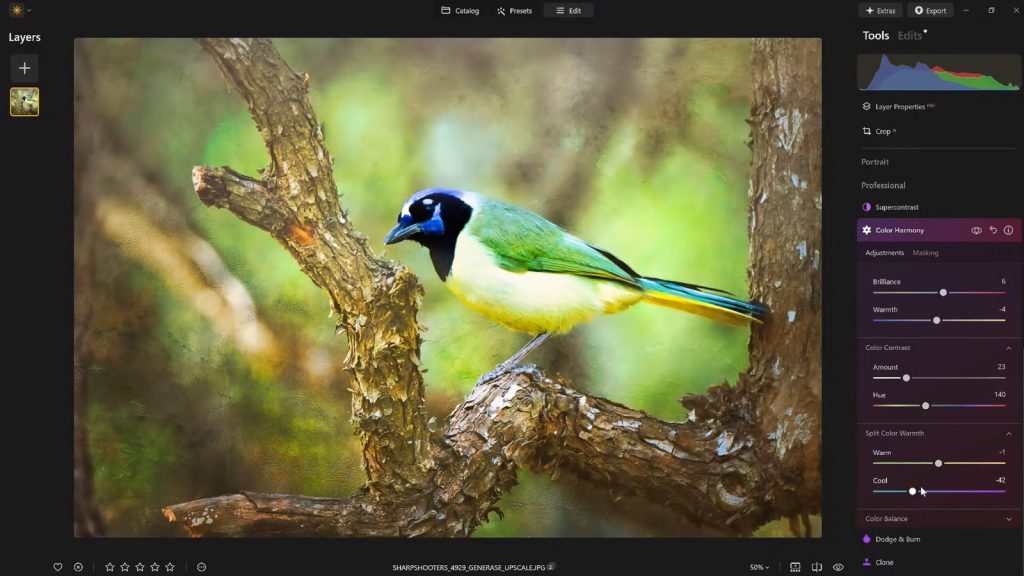
At the center of this capability is the Color Harmony tool. Nestled discreetly under the Professional Tools panel, Color Harmony offers a nuanced, precise method for refining tone, contrast, and color relationships. When paired with thoughtful vignetting and a disciplined preset workflow, it provides the exact balance of creative freedom and technical precision required to transform dull, lifeless images into compelling works of art.
Main Facts: Unlocking the Hidden Potential of Luminar Neo
The evolution of digital image processing has largely been defined by a race toward automation. Tools that promise one-click fixes have flooded the market, often at the expense of artistic intent. However, professional photographers continuously search for software that balances automation with granular, artistic control. Luminar Neo addresses this demand through specialized modules that target specific emotional and visual layers of an image.

- The Core Tool: Color Harmony, located within Luminar Neo’s Professional Tools section, allows users to manage color interactions across an entire frame rather than merely boosting individual channels.
- Key Sub-Controls: The tool is partitioned into several distinct sliders: Brilliance, Warmth, Color Contrast, Split Warmth, and Color Balance.
- Guiding Philosophy: Rather than relying on heavy-handed global saturation, these features aim to guide the viewer’s eye, establish a cohesive mood, and amplify the natural lighting conditions of a scene.
- Complementary Techniques: Beyond color grading, the workflow integrates targeted vignetting with "Inner Light" adjustments and a disciplined preset-saving strategy to prevent over-processing.
- Special Offer: Skylum and Nature TTL have partnered to offer photographers a 10% discount on Luminar Neo using the checkout code NATURETTL.
Chronology: The Modern Evolution of Digital Color Grading
Understanding how tools like Color Harmony fit into a modern photographer’s workflow requires looking at how digital post-processing has evolved over the past two decades.
Phase 1: The Era of Global Adjustments (Early 2000s)
In the early days of digital photography software, adjustments were primarily global. Photographers manipulated sliders for saturation, contrast, and white balance that affected every pixel in the frame equally. This often led to clipped highlights, unnaturally saturated skin tones, and flat images that required complex, time-consuming masking in early layer-based editors.
Phase 2: Targeted HSL and Selective Masking (2010s)
As sensors improved and software matured, Hue, Saturation, and Luminance (HSL) panels became the industry standard. Photographers could isolate specific colors—such as shifting blues in a sky or warming oranges in a sunset—without affecting neighboring tones. While powerful, this approach still required manual masking and a deep understanding of color theory, creating a steep learning curve for hobbyists and professionals alike.
Phase 3: AI-Assisted Contextual Awareness and Harmony (Present Day)
Today, software platforms like Luminar Neo leverage contextual algorithms to understand the semantic content of an image. Tools like Color Harmony do not just alter color data mathematically; they evaluate how colors interact with human psychological perception. By grouping related adjustments—such as balancing shadow warmth against highlight coolness—into intuitive panels, software now bridges the gap between complex color-grading suites used in Hollywood cinema and the rapid workflows demanded by modern outdoor, portrait, and commercial photographers.

Supporting Data and Technical Breakdown: Inside Color Harmony
To truly master the nuances of Color Harmony, a photographer must understand what each sub-control achieves on a technical and perceptual level.
1. Brilliance and Warmth: The Gentle Touch
Traditional saturation tools boost the intensity of all colors equally, frequently causing already-vibrant pixels to clip and lose textural detail. Brilliance, by contrast, behaves more intelligently.
- How it works: It lifts under-saturated tones while protecting already-rich areas from clipping.
- Best practice: A subtle, positive adjustment enriches the scene while preserving natural micro-details. Overusing brilliance introduces an artificial, hyper-real appearance that instantly betrays digital manipulation.
- Warmth: Working alongside brilliance, the warmth slider infuses the frame with either a golden, sun-kissed atmosphere or a crisp, cool shadow cast. Matching this slider to the ambient light of the original capture anchors the photograph in a believable emotional space.
2. Color Contrast: Enhancing Visual Tension
Depth in a two-dimensional photograph is largely an illusion created by managing tonal and color separation. Color Contrast increases the visual tension between opposing color ranges—most notably between warm highlights and cool shadows.
- The perceptual effect: By widening the perceived distance between these color families, elements within the frame pop forward, creating a layered three-dimensional effect without requiring aggressive sharpening or local dodging and burning.
3. Split Warmth and Color Balance: Advanced Grading
For complex lighting environments—such as a forest canopy where cool ambient shade meets shafts of warm evening sun—Split Warmth and Color Balance offer surgical precision.

- Color Balance: This tool separates adjustments into shadows, midtones, and highlights. Shifting the midtones slightly toward warmer hues can instantly transform a sterile landscape into an inviting environment, while neutralizing skin tones in portraiture.
- Consistency: For photographers managing large portfolios or client galleries, mastering Color Balance is the secret to achieving a unified, signature aesthetic across disparate shooting locations.
Official Perspectives and Expert Insights
Behind the development of these features is a dedicated team of educators and developers who understand the psychological impact of imagery. Vanelli, the Director of Education at Skylum, an accomplished author, and a well-known figure in the global photography community, emphasizes that the best edits are often the ones the viewer never consciously notices.
"What sets apart a truly compelling image often isn’t a dramatic change—it’s a handful of carefully considered enhancements," Vanelli explains. "For photographers looking to add polish without overprocessing, finishing tools must offer an intuitive balance between complete creative control and restraint."
Vanelli’s background—transitioning from a Triple Crown Karate champion to a master of visual arts and educator—informs his pedagogical approach to software training. Through initiatives like the widely acclaimed Luminar Coffee Break series and his conference keynotes, he consistently stresses that post-processing should serve the narrative of the photograph rather than overshadow it.
Skylum’s official design philosophy for Luminar Neo centers on removing friction from the creative process. By clustering advanced color theory concepts into accessible sliders within the Professional Tools tab, the company aims to democratize professional-level color grading for photographers at every skill level.

Implications for the Modern Photographer: Workflow and Restraint
The integration of advanced color harmonization tools into accessible software like Luminar Neo carries significant implications for how photographers approach both capture and post-production.
Guarding Against Over-Processing (The "Fresh Eyes" Workflow)
One of the greatest hazards in digital editing is sensory adaptation. Staring at an image for an hour causes the brain to normalize extreme adjustments, leading to heavy-handed, oversaturated, and over-contrasted results.
To combat this, a disciplined workflow is essential:
- Initial Grading: Dial in the Color Harmony, Brilliance, and Color Balance settings to taste.
- Preset Preservation: Immediately save these exact settings as a custom user preset within Luminar Neo.
- The Incubation Period: Step away from the computer. Give your eyes and mind a break—whether for twenty minutes or overnight.
- Re-Evaluation and Reduction: Upon returning, re-apply the saved preset to the raw image, but dial back the overall opacity or effect strength to roughly 70% to 80%.
This simple habit preserves the core aesthetic and color cohesion you envisioned while stripping away the subconscious tendency to over-edit.

Directing the Eye: The Role of Vignetting and Inner Light
Color work alone cannot save a poorly directed composition. Once the palette of an image is harmonized, the final step involves guiding the viewer’s eye precisely to the focal point.
Traditional darkroom dodging and burning required tedious masking and brush work. In Luminar Neo, adding a controlled vignette combined with an Inner Light adjustment creates a subtle, organic spotlight effect. By gently darkening the peripheral edges and lifting the central subject just a fraction of a stop, the image gains natural depth. The viewer’s eye is drawn effortlessly into the narrative heart of the frame, entirely unaware of the digital vignette framing their experience.
Conclusion
Photography is ultimately an act of translation. It takes the infinite complexity of a three-dimensional, living world and translates it onto a flat, static surface. Technical perfection—correct exposure, sharp focus, solid composition—is merely the grammar of this visual language.
The poetry lies in the finishing touches. Through the thoughtful application of tools like Luminar Neo’s Color Harmony, photographers are equipped to move beyond sterile technical captures and deliver resonant, emotionally charged imagery. By exercising restraint, embracing structured preset workflows, and understanding how colors interact across shadows, midtones, and highlights, creators can consistently turn ordinary shots into extraordinary visual stories.
Ready to transform your editing workflow? Photographers interested in trying these techniques can acquire Luminar Neo and receive 10% off at checkout by using the exclusive discount code NATURETTL.
